

iMap 1.3 Release Notes
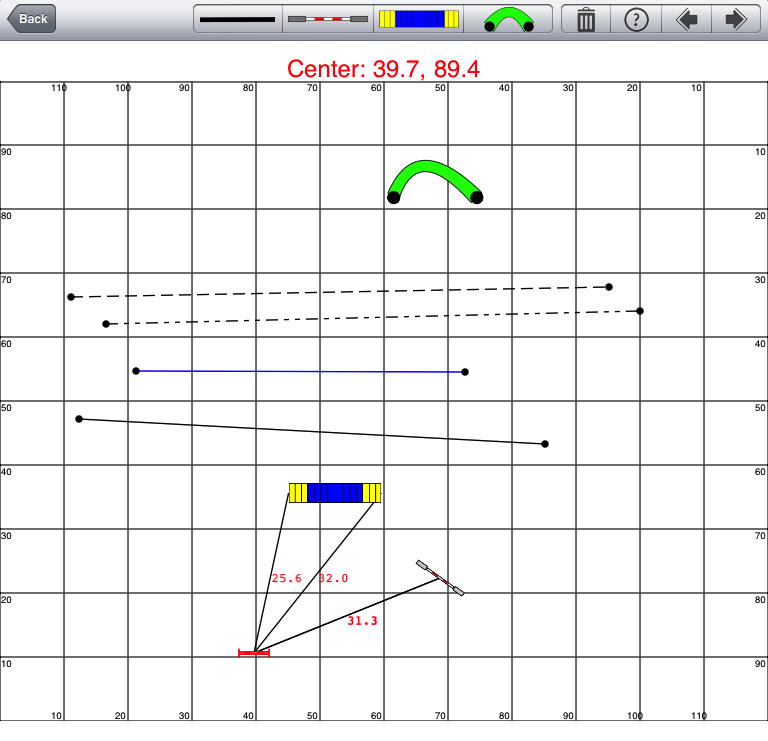 I just got an update to Agility iMap 1.3 uploaded to Apple for review. Lots of exciting new features in this version including straight line drawing and 30 levels of undo/redo support. Here is the full list:
- NEW Feature!! Draw Straight Lines (Solid, Dashed, Double Dashed)
- 30 levels of Undo/Redo support for Add, Delete, Move, and Rotate obstacles.
- Rotating obstacles is now more precise and smooth.
- When an obstacle is selected, the distance to the 4 nearest obstacles are displayed.
- The CourseMap view of the currently selected map is now cleared if the row is deleted.
- The Course Map imageView below the TableView on the front screen is now in a UIScrollView.
- Now shows the Judge & Club in the TableView for the iPad version.
- Enlarged obstacle button graphics for iPad.
- Fixed crash when editing Weave Pole obstacle.
- Prevent user from dragging obstacle off of course map.
- Fixed editing of Notes field on iPad.
- Fixed auto capitalization of Other field from Word to Sentence.
- Fixed bug in Crop view controller when in Landscape orientation.:
Comments
Version and straight lines
I installed the iPad version just yesterday. It does not have the tool to draw lines. I go to the app store app to see if there is an update and it doesn't show anything. I've opened iMap and can't figure out where to see a version number. Can you tell me how to get the version withnthe line tool?
Thanks
Marcy
Agility imap hd
Same hère on iPad it does not have the tool to draw lines. Nô update at this moment on the AppStore
Lines
The left "obstacle" button at the top of the screen, double tap it and an obstacle selector appears allowing you to change the obstacle that button represents, including lines. The same goes for the other buttons.
The left "obstacle" button at the top of the screen,
Yes thanks but only solid lines no Dashed,no Double Dashed
JP
double tap
double tap on the circle at the end of the line to edit the line properties. You can also double tap on other obstacles to edit them like change weave poles from 12 to 6.
lines
Thanks Eric
Tunnel lengths and line angles
When I attempted to change the tunnel length and tapped, OK I lost the map I had been working on. The same thing just happened when I selected a dotted line. I've built this map twice and lost it twice. I give up!!!
mac or just iphone/ipad?
Does iMap work on a mac? I don't have iPad or iPhone, but I have (and adore) a macbook.
Handler and dog
Any thoughts about adding a handler and a dog?
Handler and dog
Any thoughts about adding a handler and a dog?
changing size of contacts
When we had last chatted over email, you said that you were working on an update so that users could change the contact dimensions, espcially since TDAA has much smaller tolerances. Also to add 18 inch weave pole spacing. When are you planning to release this update?
Are you still working on this App?
I was wondering if you are still working on and further developing this app...
updating soon
I plan on updating it soon.
Picture
If i want to have a picture in imap i only can do this by taking a picture and not by select a picture from my foto's
good idea
Good idea I should change that.
Format
Would love to see:
Ability to make notes --- that way we can note handling moves as well as our errors or what we need to practice
Handler
Dog
This way we can make a path for both
create course map from photo
When I go to create a new course (hitting the plus) then hitting duplicate - I only get a drop down camera not a drop down menu where I could use a picture of a map that is already in my photos. Your youtube demo shows a drop down menu after hitting duplicate and create. How can I get this menu? This is on my ipad2 iOS 5.0.1
AgilityHerdingMom4
Need Notes!
Imsee someone else requested this but I also would love the ability to add handling moves.
Would be great for homework if it had this capability. Thanks!
curved lines?
I just downloaded your app and I was wondering if you're considering adding curved lines for handler and dog paths and moves?
I'm a NoviceA and I'd really like to be able to plan this out in detail... :) and for doing homework for preplanning...
Thanks for all your hard work, jodi
Is this APP DEAD? very BUGGY
HI The idea of the app is brilliant as well as when it works, but be prepared top loose your carefully designed courses on a regular basis and the only way to safely back them up is to email them to your self promptly. Using the latest version and iOS 5. Numerous reports on crashes here but the developer has not been heard off over a year ago why not either bring new life to this by fixing bugs properly and coming up with new features or sell this to an interested knowledgeable party?
The app is now 2 years old without any fixes, I could find no recent comments from Eric, a real shame.
Daniel